Hey there, if you’ve ever ordered something—say, a cereal box with a crumpled design, a shipping label that smudges the second it gets wet, or a cute sticker sheet that’s got weird streaks on it—you’ve probably run into a flexo printing flop. And honestly? I’ve seen it all, since I run a flexo printing machine supply biz that’s been around long enough to know quality control (QC) isn’t just some fancy buzzword—it’s the make-or-break part of turning a messy ink blob on a plate into the product your customers actually want. Let’s break this down like we’re chatting over coffee, no stuffy textbook jargon, promise. Flexo Printing Machine
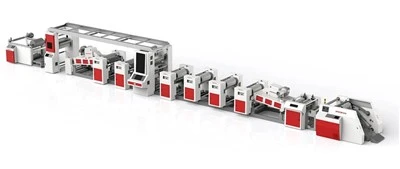
First, let’s cut through the confusion: flexo printing is that super fast, roll-to-roll method most brands use for packaging, labels, corrugated boxes, even those little candy wrappers you grab at the gas station. It’s way cheaper and faster than offset or digital for big runs (we’re talking thousands or millions of copies, not just a handful), but that speed means QC can’t be an afterthought. If you rush it, you end up with whole runs of garbage that no brand is gonna pay for—something I’ve seen way too many small print shops learn the hard way, because they skip the checks to hit a tight deadline.
Now, what actually is flexo printing QC? It’s not just staring at a sheet and going “eh, that looks fine.” It’s a whole sequence of checks at every single step of the process, from the second you load a roll of substrate (that’s paper, plastic, whatever you’re printing on) to the minute the finished roll gets boxed up and shipped out. Let’s walk through it step by step, since that’s how I teach my clients when they buy our machines—no skipping steps here, okay?
First up: pre-press QC. This is before any ink even touches a plate, and it’s the most important step because fixing a mistake here is way cheaper than fixing it when you’ve printed 10,000 boxes. Pre-press is all about making sure the design file, the printing plate (we use photopolymer plates for flexo, by the way), and the setup match exactly what the customer asked for. Last year, a local print shop I work with came to me panicking because their designer had flipped a logo’s colors—red was blue, blue was red—and they’d already burned 50 plates before catching it. That’s $2,000 in wasted plates and a missed client deadline, all because they didn’t have a second set of eyes on the design file. Our flexo machines have built-in pre-press checks now, too—little scanners that scan the plate before it goes on the press, flagging if the registration (how all the colors line up) is off or if there’s a tiny blemish on the plate that would show up as a white spot on every print. Pro tip: never skip the plate inspection, even if it came from a vendor you’ve used a hundred times. Accidents happen, and one bad plate can tank a whole run.
Next: startup QC. When you first fire up the flexo press, things are always wonky at first. The substrate’s tension might be off, the ink viscosity (how thick or runny it is) might be wrong, or the registration (again, that color lining up thing) could be a hair off. Startup QC is the 50-100 test prints you pull before you run the full job, and I tell every client to not even think about skipping this. I once had a guy buy one of our mid-range flexo presses, brag he could “wing it” on startup, and ended up with 20,000 bad shipping labels that his customer rejected. He saved 30 minutes by skipping startup checks, lost thousands in reprints, and had to eat the cost of the bad labels. No thanks. What do we check in startup? First, visual: hold the test print up to the digital proof the client signed off on. Is the logo the right size? Are the text lines sharp, not blurry? No smudges around the edges? Then, registration: run a ruler along the edge, check that each color (cyan, magenta, yellow, black, or spot colors) lines up perfectly—no overlapping or gaps. Then, ink adhesion: rub a dry paper towel on the test print. If ink comes off, that means the ink isn’t drying right or the substrate isn’t prepped enough, and you need to adjust before running full speed.
Once the press is running steady, that’s run-time QC. This is where most small print shops mess up—they set the press and walk away, checking every few hours, but that’s too slow. Modern flexo presses (the ones we supply, obviously) have built-in cameras that scan every inch of the web (the roll of material going through the press) 100 times a second, catching things you’d miss if you were staring at a sheet. What do these cameras look for? Stuff like:
- Register drift: over time, the web stretches a little as it goes through the rollers, so the colors can shift by a fraction of a millimeter. That’s not noticeable at first, but after 10,000 prints, it becomes a big messy line.
- Ink streaks: if the anilox roller (that’s the little roller that transfers ink to the plate) has a tiny clogged cell, it’ll leave a light or dark streak all along the print. Our machines have anilox roller cleaners that flag clogs before they show up on the print, which saves so much time.
- Substrate defects: like tiny tears, dust, or spots on the roll that would show up as a hole or a blurry spot on the package. No one wants a bag of chips with a hole in it, right?
- Color matching: flexo uses spot colors a lot, so you have to make sure the color you print matches the Pantone code the client specified. Our machines have color sensors that scan every print, compare it to the Pantone value, and adjust the ink mix automatically if it’s off. That’s a game-changer—no more “close enough” color that the client complains about after delivery.
Then, there’s post-press QC, which is after the printing is done, when you’re cutting, folding, or laminating the material. This is easy to skip because the printing looks perfect, but the finishing can mess it up. For example, if you’re printing corrugated boxes, the die-cutting (cutting the shape of the box) might be off, so the flaps don’t line up when you fold it. Or if you’re printing labels, the slitting (cutting the roll into individual labels) might leave sharp edges that peel, or the labels might be misaligned on the backing. We always tell our clients to set up a separate post-press QC station, where someone pulls every 50th box or 100th label and checks for things like die-cut accuracy, adhesion, and no smudges from the cutting process. Last month, a client of mine had a run of 50,000 water bottles that printed perfect, but the labeling machine cut the labels a millimeter too short, so they couldn’t wrap all the way around the bottles. They caught it in post-press QC (thankfully, they had a good one) and re-ran the bad batch before shipping, so their customer didn’t lose trust.
Wait, but what about common QC myths I hear all the time? Let’s bust a couple, because they’re killing print runs. First myth: “QC slows down production.” No—skipping QC slows down production way more. If you have to stop the press every hour to fix a mistake, that’s more downtime than a 10-minute startup check. Our flexo presses are built to cut down on QC time, too—they have automatic adjustment for registration and color, so the operator doesn’t have to tweak dials every five minutes, which keeps things moving fast while still staying accurate.
Second myth: “Digital QC is better than manual.” Nah, it’s a team effort. The automatic cameras catch 99% of defects, but a human can catch stuff a sensor misses—like a tiny typo in the fine print, or a logo that’s slightly tilted even if the colors line up. I always tell my clients to have at least one person who knows the client’s design (or has the digital proof printed out) do a visual check of every 500th piece, just to catch those tiny, stupid mistakes that make you look unprofessional.
Another big thing: documentation. Good QC isn’t just catching mistakes—it’s tracking them so you don’t make the same one twice. For example, if you notice that registration drifts every time you run a 20-inch wide roll of plastic, you can adjust the press’s tension settings for that size next time. Our machines come with built-in software that logs every QC check, every adjustment made, and any defects found, so our clients can look back at past runs and fix consistent issues. That’s one of the things I tell people when they’re shopping for a flexo press—don’t just look at speed or price, look at the QC tools the machine has, because that’s what’s gonna keep your runs profitable.
Let’s be real: flexo printing is super competitive. Brands don’t want to pay for a run of boxes that smudge, labels that fall off, or packaging that looks unprofessional because it’s streaky. QC is how you deliver on what you promised, and that’s what makes customers come back. I’ve had clients tell me that since they started using our flexo presses and our suggested QC workflow, their reject rate dropped from 8% to less than 1%—that’s thousands of dollars saved every month, just from not wasting material or reprinting runs.
If you’re in the print game, whether you’re a small shop just starting out or a big plant doing huge runs, QC isn’t something you can half-ass. It’s a habit, a process, and a tool that makes your job easier, not harder. And if you’re in the market for a flexo printing machine that’s built to handle solid QC without slowing you down, we’ve got you covered—we don’t just sell machines, we help our clients set up their QC workflow so they stop wasting time and money on bad runs.
Wait, quick note: I know this stuff can feel overwhelming if you’re new to flexo, but that’s why we’re here. Whether you’re struggling with color matching, registration, or just figuring out where to put QC checks in your process, we’re happy to chat through it. No pressure, no sales pitch (well, okay, a little), just real talk from someone who’s been in this biz for years and has seen every QC horror story imaginable.
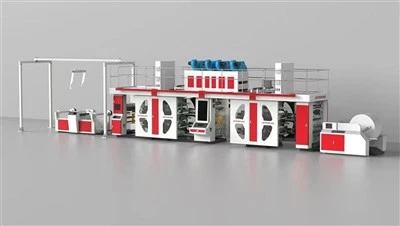
If you wanna learn more, or just ask questions about what QC works best for your specific type of printing (labels, packaging, corrugated, whatever), reach out and we can walk through it. No stuffy emails, no hoops to jump through—just real advice for real print shops.
Slitting Machine References
Flexographic Printing: A Guide to Quality Control. Printing Industries of America, 2022.
Anilox Roller Technology and Quality Control in Flexo Printing. Flexo Technical Association, 2021.
Pre-Press Quality Assurance for Packaging. Packaging Digest, 2023.
Roll-to-Roll Printing QC: Best Practices for High-Volume Runs. Converting Magazine, 2022.
Wenzhou Haidobao Machinery Technology Co., Ltd.
As one of the most professional flexo printing machine manufacturers in China, we have world-leading production equipment and strong manufacturing capabilities. Please rest assured to wholesale durable flexo printing machine for sale here from our factory. All customized machines are with high quality and competitive price.
Address: No. 116, Xinglong Road, Wanquan Town, Pingyang County
E-mail: 214949666@qq.com
WebSite: https://www.hdbmachinery.com/
